
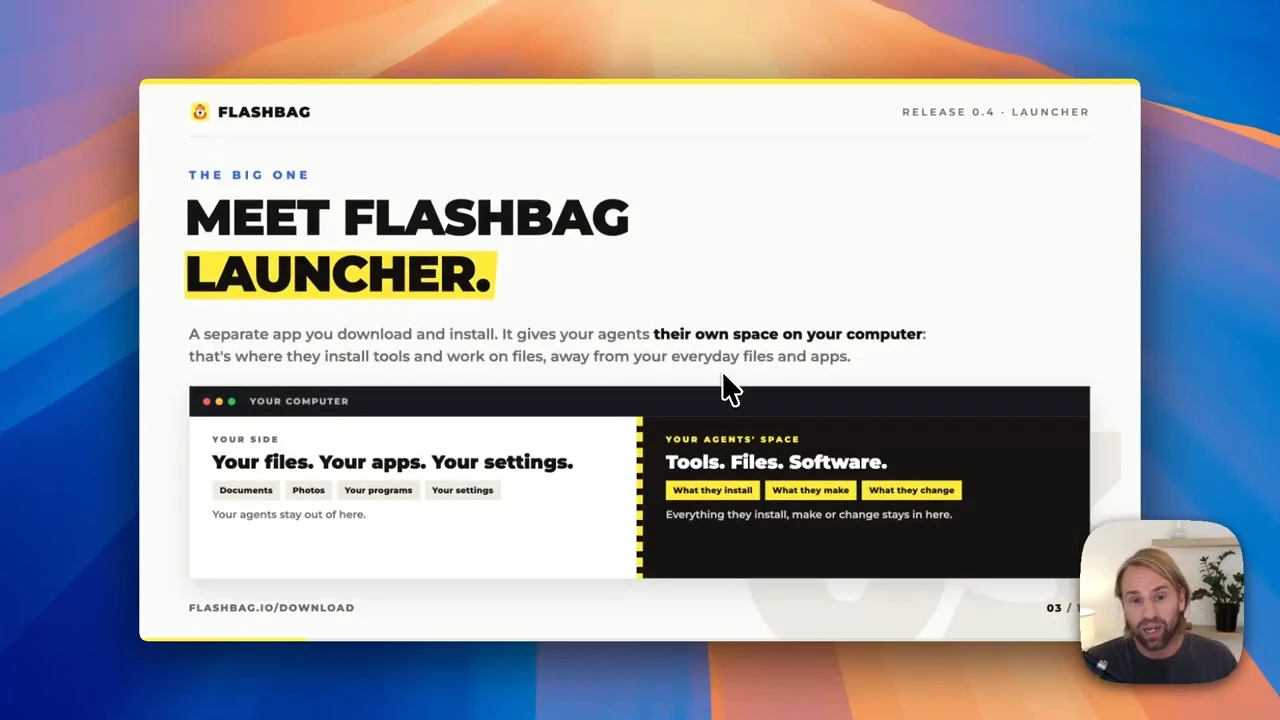
You shouldn't need a separate computer just to give your AI team room to work. Flashbag 0.4 introduces Launcher: a way to run your agents in their own workspace while you keep using your computer for everything else.
It also brings Flashbag to Windows. Add a built-in Tailscale connection, new Claude and OpenAI models, and more time for your agents to finish a job, and this is a big change to how you can use Flashbag every day.
This walkthrough covers the 0.4 releases through 0.4.2. Launcher and the new Remote access setup arrived in 0.4.0 on September 22; the model and time-limit updates followed in 0.4.1 and 0.4.2.
Meet Launcher. A workspace for your agents.
Flashbag Launcher is a separate app you download and install. It gives your agents a contained space with their own tools, files and software, helping keep their work away from the everyday files and apps on your computer.
Launcher handles installation, starting, stopping and updates. Flashbag runs in the background, and you work with your team in your browser. Your data still lives on the computer hosting Flashbag. Using a browser doesn't move your memory or your agents into our cloud.
This is the option I recommend when you want to run Flashbag on a computer you also use for other things. Your agents get room to work, and you keep using your own apps and files alongside them.
Flashbag Launcher
A contained workspace for the AI team. You use Flashbag in your browser.
- Mac, Windows and Linux
- Tools included for browsing and working with files
- A good fit for a computer you also use yourself
Flashbag Desktop
Runs directly on the computer, giving agents wider access to its tools and files.
- Apple silicon Macs and Linux
- Work with apps installed on that computer
- A good fit when you want that wider access
That difference matters if an agent needs to operate a desktop app you already use, such as a video editor. Launcher's own media tools can work on media files, but it doesn't give agents the same access to the apps installed on your host computer.
Windows is here. So are the tools to get started.
You can now run Flashbag on a Windows computer through Launcher. There are Launcher downloads for macOS and Linux too, so you can choose the setup that fits the computer you already have.
Launcher includes tools for browsing websites and working with documents, images and media. That means more tasks can get going without you first having to find and install each tool yourself.
Updates fit around your work as well. Download a new Flashbag version while your agents are busy, then apply it when you're ready to restart. Downloading the update and interrupting your work no longer have to happen at the same moment.
Move to Launcher. Keep the team you've built.
If you already use Flashbag Desktop, you can move to Launcher on the same computer and keep your agents, memory, conversations and settings. You don't need to hire your team all over again.
- Download and install Launcher separately from the download page.
- Update Flashbag Desktop to the current 0.4 release.
- Let running work finish, then quit Desktop.
- Start Flashbag through Launcher. It picks up your existing data on that computer.
- Sign in to your AI services again the first time, then continue with your team.
Choose the setup you want to use and close the other one first. Flashbag now explains what to close if another copy is already using your data.
Remote access, with Tailscale built in
You no longer need a separate Tailscale installation on the computer running Flashbag. Connect directly from Settings → Remote Access → Connect to Tailscale.
Connection status, addresses and password controls now live together. You can choose an address name that's easy to remember, with clearer guidance if sign-in or device approval needs your attention.
Your other devices still need Tailscale connected to the same network. Once connected, you can open Flashbag from another computer or your phone, with the same agents, memory and tasks.
Before updating remotely, arrange another way to reach the host computer. After updating, open Flashbag on that computer, connect to Tailscale again from Remote Access settings, and save the new address.
Your old Flashbag address no longer works after this change. Your existing Remote access password is kept.
New models. More time to finish the job.
The AI world keeps moving, and your Flashbag team comes with it. The 0.4 updates add three new models:
- Claude Opus 5.5 arrived in 0.4.1 and is the default Claude model for Agent replies and Gordon.
- GPT-6 Sol arrived in 0.4.2 and is the default for Agent replies and Gordon when Codex is enabled.
- GPT-6 Luna also arrived in 0.4.2 and is the default for helper work when Codex is enabled.
You can choose the model that fits the work while keeping the agents and memory you've already built.
We've also removed the default 15-minute time limit in 0.4.2. Research and other longer jobs shouldn't stop just because the timer ran out. Agent work is now set to Unlimited by default.
You stay in control. Open Settings → Agents if you'd rather set a time limit. Updating resets any previously saved limit to Unlimited once, so choose a new one if you want to keep a cap.
Easier sign-in, and better recovery when things go wrong
Codex now gives you a code to enter in your browser. Claude gives you a command to copy, with instructions for where to run it, and Flashbag checks automatically when sign-in completes. You can reconnect either one from Settings.
Existing Claude users need to sign in again. Flashbag now keeps Claude sign-in and settings separate from other Claude use on your computer. Your saved conversations and memory stay intact, but connections added through claude.ai no longer carry over.
- Chats can recover an unavailable session. If Claude, Codex or Pi can't reopen it, Flashbag starts fresh with the Agent's usual memory preload and retries your message, while keeping the saved conversation.
- Browser recovery is clearer. Reload Flashbag appears when an update leaves a tab out of date or unable to connect.
- Uploads explain what went wrong. Clearer errors can be dismissed before you try again.
- Updates make extra checks. Flashbag verifies that a download is the right release for your computer before installing it.
For all the changes across 0.4.0, 0.4.1 and 0.4.2, see the full changelog.
Flashbag 0.4 is available now.
Download Launcher for Mac, Windows or Linux, or update your existing Desktop installation. Your team is ready for its next job.